
Automate Repetitive Business Tasks with AI and LLMs
Stop Doing Everything Yourself: Using LLMs and Automation to Handle Repetitive Business Tasks
If you run a business, you already know the frustration of the daily grind. You probably started your company to solve a specific problem or build a great product, but you end up spending half your week buried in tedious, repetitive tasks. Copying data from an email into a spreadsheet. Answering the same customer question for the fifth time this week. Sorting through invoices.
These repeatable jobs drain your time and eat into your profit margins. Hiring people to do them is expensive, and human error is inevitable when the work is mind-numbingly dull.
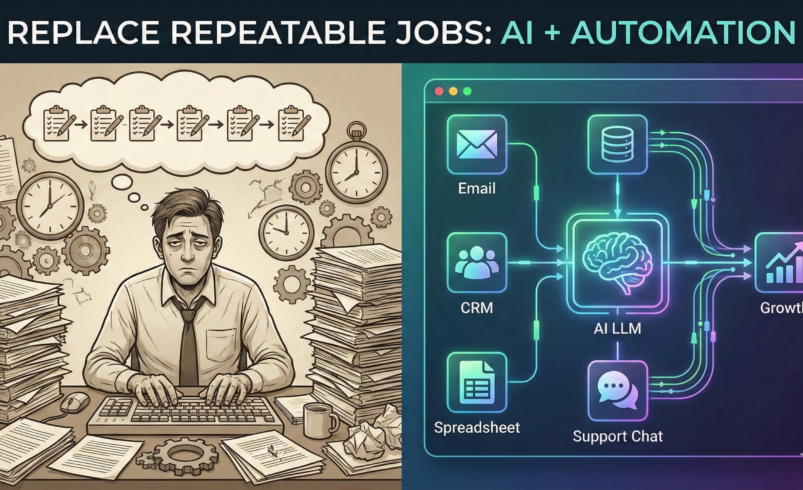
This is where the combination of Large Language Models (LLMs) and automation tools comes in. By connecting platforms like ChatGPT, Claude, or Gemini to workflow tools like Zapier or Make, you can build systems that do the heavy lifting for you. It is no longer just about writing emails faster; it is about replacing entire operational bottlenecks.
Here is a practical look at how you can use these tools to replace repetitive jobs in your business right now.
Turning Customer Support into a Self-Sustaining System
Most customer support requests follow a predictable pattern. People want to know where their order is, how to reset a password, or what your return policy is. In the past, automated chatbots were notoriously rigid and frustrating for customers to use. They relied on specific keyword triggers and often trapped users in endless loops.
LLMs have completely changed this dynamic. Because they understand natural language and context, they can read a customer’s poorly typed, frustrated email, figure out exactly what the issue is, and draft a perfect response based on your company’s internal documentation.
You can set up a workflow where every incoming support ticket is first routed to an LLM. The automation tool sends the customer’s message and a hidden prompt containing your business rules to the AI. If the AI knows the answer with high confidence, it can reply directly and close the ticket. If the issue is complex or requires human empathy, the AI can tag the ticket, summarize the customer’s problem, and assign it to the right staff member. You reduce your ticket volume drastically without sacrificing the quality of your customer service.
Eradicating Manual Data Entry
Data entry is the classic repetitive job. It usually looks like this: you receive an email with a PDF invoice, you open it, you read the line items, and you type those numbers into your accounting software or CRM. It is slow, boring, and highly prone to typos.
You can automate this entire sequence. You can set a trigger in your email provider so that whenever an email with an invoice attachment arrives, the automation tool grabs the file. It passes the PDF to an LLM instructed to act as a data extraction tool. The prompt tells the AI to pull out the vendor name, date, total amount, and line items, and format that information as structured data (like a JSON file).
The automation tool then takes that perfectly formatted data and creates a new entry directly in QuickBooks, Xero, or Salesforce. A process that used to take three minutes per invoice now happens in seconds, quietly in the background, while you sleep.
Scaling Personalized Outreach and Follow-ups
Sales and marketing require persistence, which means sending a lot of follow-up emails. The problem is that generic, automated follow-ups are incredibly obvious to the recipient and usually end up in the trash. Personalizing every single message takes hours.
By combining your CRM with an LLM, you can automate personalization at scale. Let’s say a lead downloads a whitepaper from your website. Your automation tool registers this event. It looks up the lead’s company on LinkedIn, pulls the latest news about that company, and feeds all of this context to an LLM.
The AI drafts a highly specific, tailored email that references the whitepaper they downloaded and mentions their company’s recent milestone. The email is then queued up in your outbox for your review, or sent automatically. You get the conversion rates of a handcrafted, personalized sales pitch with the volume of an automated blast.
How to Implement This Without Breaking Your Business
The biggest mistake business owners make with AI is trying to automate everything all at once. If you automate a broken process, you just create a faster broken process.
To start replacing repeatable jobs, follow these steps:
-
Audit Your Week: Keep a notepad on your desk for three days. Write down every single task you or your team does that takes more than five minutes and requires zero critical thinking.
-
Standardize the Process: Before an AI can do a job, you need a Standard Operating Procedure (SOP). Write down the exact steps a human takes to complete the task. What data do they look at? Where do they click?
-
Start Small: Pick the most annoying, lowest-risk task on your list. Use a tool like Zapier to connect the trigger (e.g., a new email) to the action (e.g., drafting a response with an LLM).
-
Keep a Human in the Loop: For the first few weeks, do not let the AI take action on its own. Have it draft the email, extract the data, or sort the tickets, but require a human to hit “approve.” Once you see that the system works reliably, you can remove the training wheels and let it run fully autonomously.
The goal of integrating LLMs and automation isn’t just to cut headcount. It is about reallocating your human capital. When you and your team are no longer acting like robots doing manual data entry, you finally have the time to do the things AI can’t do: build relationships, strategize, and grow the business.

